introduction
The goal of this assignment is to familiarize you with recursion, including thinking recursively and implementing recursive functions.
Please note that this is an individual assignment. Although high-level discussion and collaboration is encouraged, you should each implement and submit your own solution, and you should never be looking at another student's working code. If you are unsure as to whether particular behaviors are allowed, please consult with an instructor!
part 1
Getting started
To begin, create a new project named RecursiveGraphics in the
CSCI51p-Workspace you created on your
Desktop. Double check that you are creating the project in the
right place, or you will likely have trouble finding your files
later. Then download the starter code
and copy it into the (recently
created) CSCI51p-Workspace/RecursiveGraphics folder.
If you don't see
the new file, ask PyCharm to rescan that folder by clicking the triangle
next to that folder (on the left-side list) to close and re-open it. The newly
added file recursive_graphics.py should now be visible.
Task 1: turtle graphics
Turtle graphics are a way of drawing an image by moving a turtle around the Cartesian plane. We can do this in Python by using the turtle module. There's online documentation available here.
Note: Turtle module is usually installed along with the python package that you installed in the first lab. If it is not installed on your machine, please ask the lab instructor to help you install it manually.
Take a look at section 24.1.2.1, titled "Turtle methods." Note that the word "method" is often used when doing object-oriented programming. We'll talk more about object-oriented programming towards the end of the semester. At the moment that's not what we're doing, so you can think of these as functions. The following are a few that you might find useful (there are many others; feel free to explore!):
position
setposition
forward
heading
setheading
left
right
penup
pendown
pencolor
dot
circle
speed
fillcolor
begin_fill
end_fill
Take a look at the descriptions of some of these functions online (note: being able to read and make sense of online documentation is a very useful skill! python.org is your friend!). Figure out what the functions take as paramters, what they do as a side-effect, and what they return.
As an alternative to looking at the online documentation, the help function takes as an argument the name of a function and outputs the docstring (i.e. function description). You can try using help in the Python console to get the documentation for some of the above functions.
Note: At the top of your file, you must include the import statement for the turtle module:
from turtle import *
If you try to use help function to explore the window_width, the console output will look as follows:
>>> from turtle import *
>>> help(position)

Help on function position in module turtle:

position()
    Return the turtle's current location (x,y), as a Vec2D-vector.

    Aliases: pos | position

    No arguments.

    Example:
    >>> pos()
    (0.00, 240.00)
Once you have a general idea of how turtle works, take a look at the starter code
recursive_graphics.py. We've provided an example
function draw_triangle that uses the turtle
functions pencolor, pendown, forward,
and left to draw an equilateral triangle. We've also
provided a main method main_part that draws a dot at the center of
the screen and then draws an equilateral triangle centered at that
dot. In addition to calling the helper function draw_triangle, the
main function also uses the turtle functions dot, penup,
pendown, setposition, setheading, hideturtle,
and done. Try running the starter code. Do you understand
what this code does? Do you understand what each of the turtle
functions do?
Task 2: draw_polygon(n,length)
Your next task for part 1 is to define a method called draw_polygon that takes
two parameters: the number of sides n (an int) and the length of each side
length (an int). It then draws a polygon of that size and shape by first going
forward length amount before turning to the left (counter-clockwise). The turtle
should end facing in the same direction as when it started.
Note: For those rusty on geometry, an n-sided polygon has n equal length edges
and the angle between a straight line drawn from one side and the adjacent side is
360/n. So, for example, the angle between a straight line drawn from one side and
the adjacent side of an equilateral triangle is 120 degrees, as we saw in the
function draw_triangle.
Below are some polygons with differing numbers of sides and different side lengths. All can be drawn with the draw_polygon function.
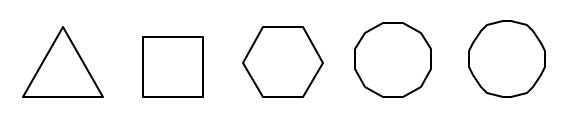
Once you think your function is working, modify the main_part1 function to draw
polygons with 3, 4, 6, 12, and 30 sides. Try to make them not overlap!
Task 3: recursive stairs
Your final task for Part 1 is to use turtle to draw a recursive staircase. Consider the following diagram of a staircase:
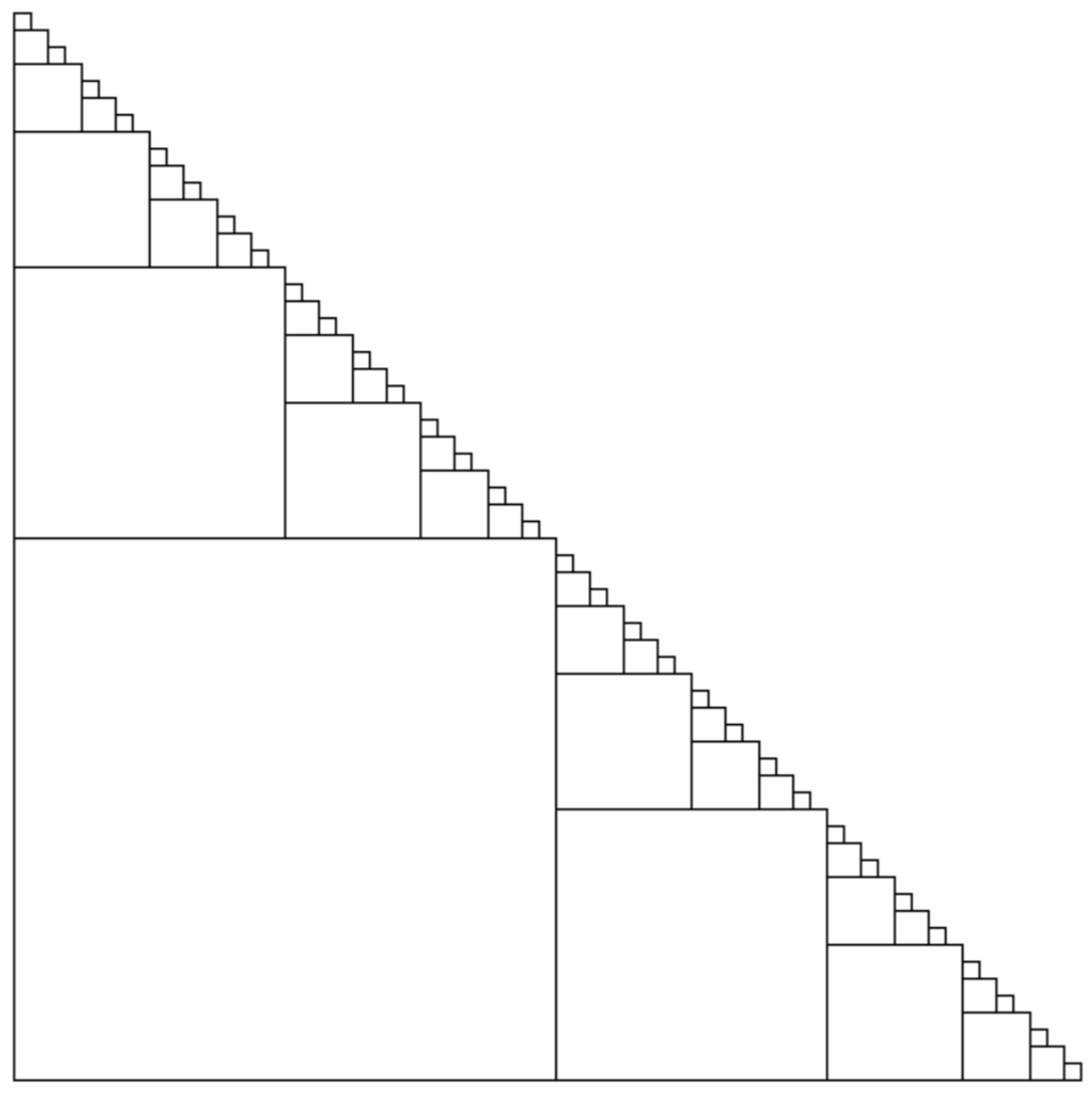
Notice that a staircase drawing consists of a large square in the lower left, a smaller staircase just above it, and a smaller staircase to the right of it.
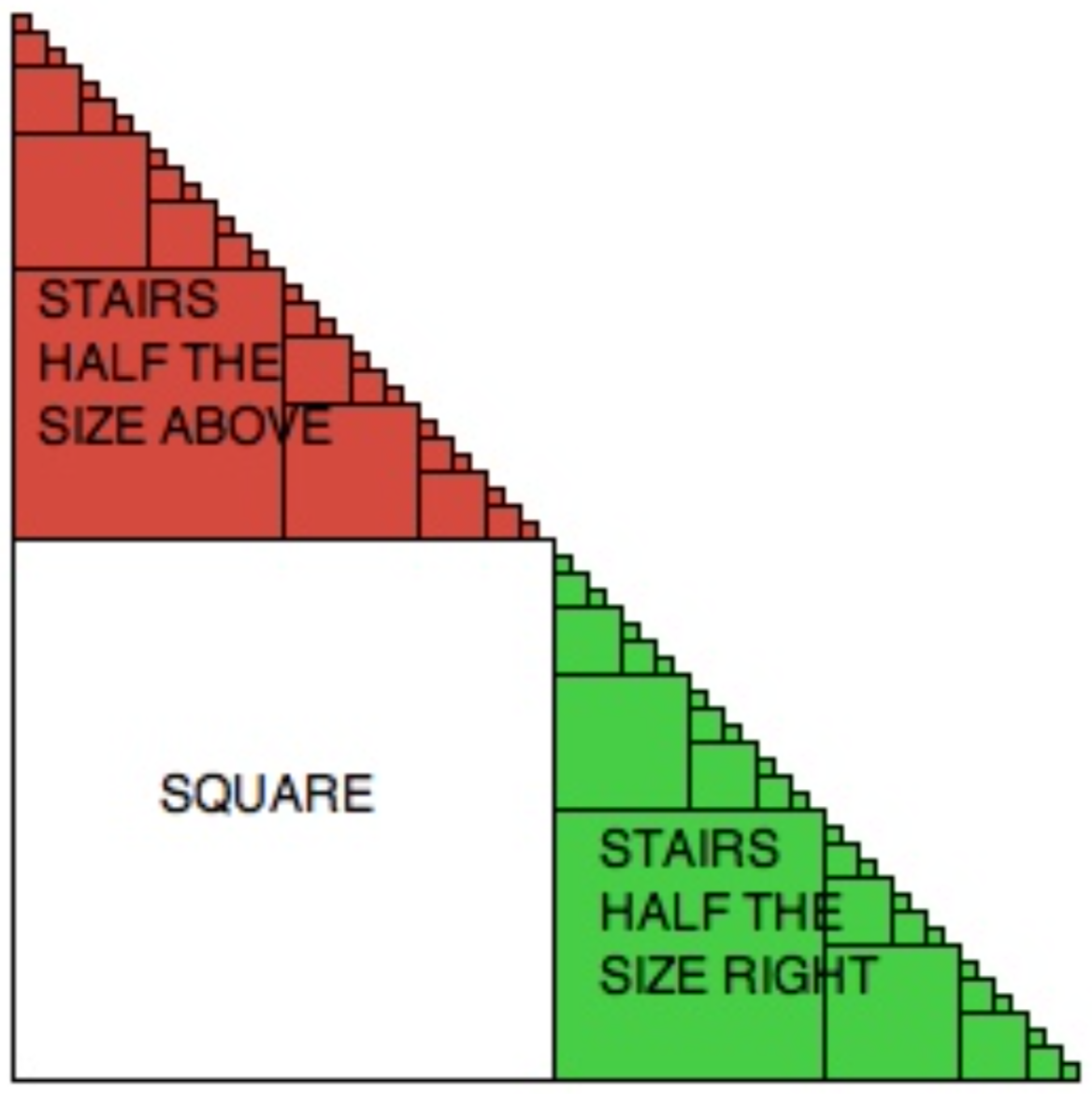
Question: How would we define a staircase recursively? Recall that a recursive defintion should have the form: a staircase is a y with n smaller staircases unless it is really small, in which case it is z.
Observe that staircases are specified by the x
and y coordinates of the bottom left corner of the
staircase and the length l of a side of the square in the
lower left hand corner.
Question: If we drew stairs starting at (x, y)
with length l, what would be the coordinates and the
length of the recursive staircase above (colored in red above) and the
recursive staircase to the right of the initial square (colored in
green above)? The answer should be given relative
to x, y, and l.
Note: Please answer the two questions above before you continue to the implementation, as a well-designed solution will save you a lot of time! If you are not sure about these answers, please feel free to discuss with a lab instructor.
Implementing a staircase: You will implement a function called
stairs(x, y, l) whichs draw a staircase that looks like
the first example above (the one without the red or green color). The
stairs function should take three parameters: the x
and y coordinates of the bottom left corner of the stairs, and
l, the length of the side of the square in the bottom
left hand corner. You should recursively draw stairs as long as the
side length is greater than 10 (i.e., staircases with l
<= 10 are considered really small). The stairs
function should return the number of squares that are drawn during the
evaluation of the recursive function stairs. For
example, the return value of calling stairs(0, 0, 100)
should return 15.
One way to do this lab would be as follows:
- Start with your recursive definition of a staircase.
- Add details to your recursive definition based on the information given above: what is "very small"? And how would you characterize the smaller staircase(s)?
- Now work on your stairs function by turning the detailed recursive definition into code.
Note that you can use existing helper functions or develop new helper functions to achieve your goal.
Suggestion: Powers of 2 (128, 256, 512, etc) work well for starting lengths.
Once you think your stairs function is working, modify
the main_part1 function to make it draw the staircase
shown in the first diagram above, then hide the turtle, and finally
call done().
Planning for Part 2
Read through the description of Part 2. For Part 2, you will implement a recursive
function snowflake. What is a recursive definition of a snowflake?
Checking In
Before finding a TA or professor, make sure your four functions work correctly and are written using good coding style. In particular, make sure your functions have:
- appropriate docstrings
- good algorithm comments
- mnemonic variable names
- good use of horizontal and vertical white space
We will double check your code, ask you a few questions about it, and answer any questions you have. We will then ask you for the answers to the Part 2 Example and answer any questions you might have about Part 2. We will then award your points for Part 1.
This must be completed before leaving the lab.
After that you should start working on Part 2. Remember to go down to the bottom
of the starter code and comment out the call to main_part1 (and uncomment the
call to main) before you start Part 2.
part 2
Specification
For Part 2, you will use turtle to draw a recursive picture of snowflake. To do
this, you need to implement a function called snowflake(x, y, size) as
specified below:
-
snowflake(x, y, size): this is a recursive function takes three ints and returns an int. It draws an 8-pointed star centered at(x, y); each arm has lengthsize. It then recurses at the end of four of the arms withsize/3as shown in the image below. If the parametersizeis less than 5, the function draws a red dot of size 5 at(x, y). The function has a return value that is the total number of arms that were drawn in this recursion process.
Note that you can use existing helper functions or develop new helper functions to achieve the goal.
In the main function, you should call the function of snowflake, then hides
the turtle, and finally calls done().
Sample run
The following is a screenshot from calling snowflake(0, 0, 100).
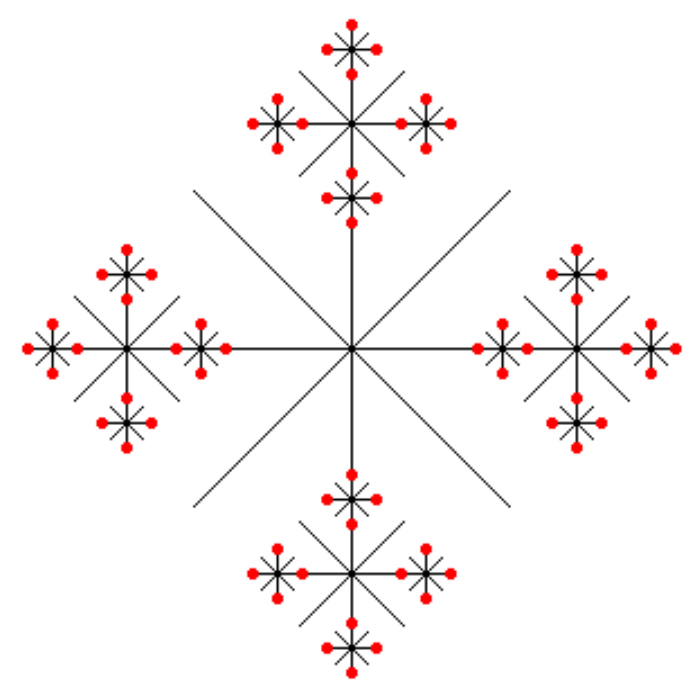
The return value should be 168.
Coding style
Make sure that your program is properly commented:
- You should have comments at the very beginning of the file stating your name, course, assignment number and the date.
- Each function should have an appropriate docstring, describing:
- the purpose of the function
- the types and meanings of each parameter
- the type and meaning of the return value(s)
- Include other comments as necessary to make your code clear
In addition, make sure that you've used good style. This includes:
- Following naming conventions, e.g. all variables and functions should be lowercase.
- Using good (mnemonic) variable names.
- Proper use of whitespace, including indenting and use of blank lines to separate chunks of code that belong together.
For more detailed descriptions, please review the Python Coding Style Guidelines
Ethical Reflection
In this lab you used the turtle Python module to draw some simple recursive pictures. Recent advances in generative AI, such as Stable Diffusion, DALL•E, and Midjourney have made it possible for anyone to generate complex imagery from simple text prompts. We can even generate full videos (like through Sora) now. These systems work by taking lots of "training data" (existing images) and linking them with descriptive text. While these techniques are similiar to those used to produce deepfakes, image generation doesn't necessarily have to be emulating a known person.
For the ethical reflection part of the assignment, you should use any image generator of your choice (for instance, this free one from DeepAI) to generate a scene for a flyer to promote a campus event. The campus event is a community building picnic for Pomona CS students.
After you've generated the images, take a moment to answer the following questions: Are you happy with the image quality (i.e., would you actually use it for a flyer)? What do you notice about the kinds of people you generated (e.g., do they conform to or defy any racial or gender stereotypes? Are they diverse in weight, ability, age--should they be?)? Also write down some reflections on ethical considerations of using AI generated imagery as a whole. How do you think, if anything, it's going to change how we interact with images? What groups or identities of people (like artists) are going to be disproportionately affected, and how are they going to be affected? If you were the CEO of an image generation company, what are some things you could do to make image generation more ethical?
Create a file named ethics.pdf and paste the generated results and the text prompt you entered. Also write a short (1-2 paragraphs is fine, definitely not more than 1 page) reflection addressing (1) your impressions of your results and (2) your feelings on AI generated images as a whole.
Feedback
Provide a file namedfeedback.txt that answers the usual questions:
- How long did you spend on this assignment? Please include time spent during lab, including time spent on Part 1.
- Any comments or feedback? Things you found interesting? Things you found challenging? Things you found boring?
logistics
Submission
For this lab you are required to submit three files:
-
recursive_graphics.pya Python file that draws the snowflake picture as specified above -
ethics.pdfyour generated flyer imagery and ethical reflection -
feedback.txta text file containing your feedback from this assignment
Note that we will deduct points if your files are incorrectly named, if you do not include your name in the correct place, or if you do not include all files in your last submission. Please double and triple check this before submitting!
Grade Point Allocations
| Part | Feature | Value |
|---|---|---|
| Lab | Check-in of Part 1 | 3 |
| Execution | Accurate draw of snowflake |
10 |
| Execution | Accurate return value from snowflake |
3 |
| Execution | main is correct |
2 |
| Style | Correctly named files | 1 |
| Style | Files submitted together | 1 |
| Style | Correct file-level multi-line comment | 1 |
| Style | Correct function docstrings | 3 |
| Style | Good use of inline comments | 1 |
| Style | Good use of variable names | 1 |
| Style | Good use of whitespace | 1 |
| Style | Good use of loops and conditionals | 1 |
| Style | Misc good style | 1 |
| Ethics | Completed ethical reflection | 2 |
| Feedback | Completed feedback file submitted | 2 |